Permissions
The Capmail module uses two levels of permissions: standard Dolibarr permissions (granted via user roles) and the per-mailbox rights matrix (configured in the module administration).
Dolibarr permissions
These permissions are granted to users or groups via Home > Setup > Users & Groups.
| Permission | Description |
|---|---|
| Read Capmail data | Read access to collected emails |
| Download Capmail files | Downloading attachments |
| Delete Capmail messages | Permanent deletion of emails, from all screens |
| Read input templates | Viewing detection/extraction templates |
| Create/Update input templates | Creating and modifying templates |
| Delete input templates | Deleting templates |
| Use a personal mailbox | Allows the user to configure their own private IMAP mailbox |
Per-mailbox rights matrix
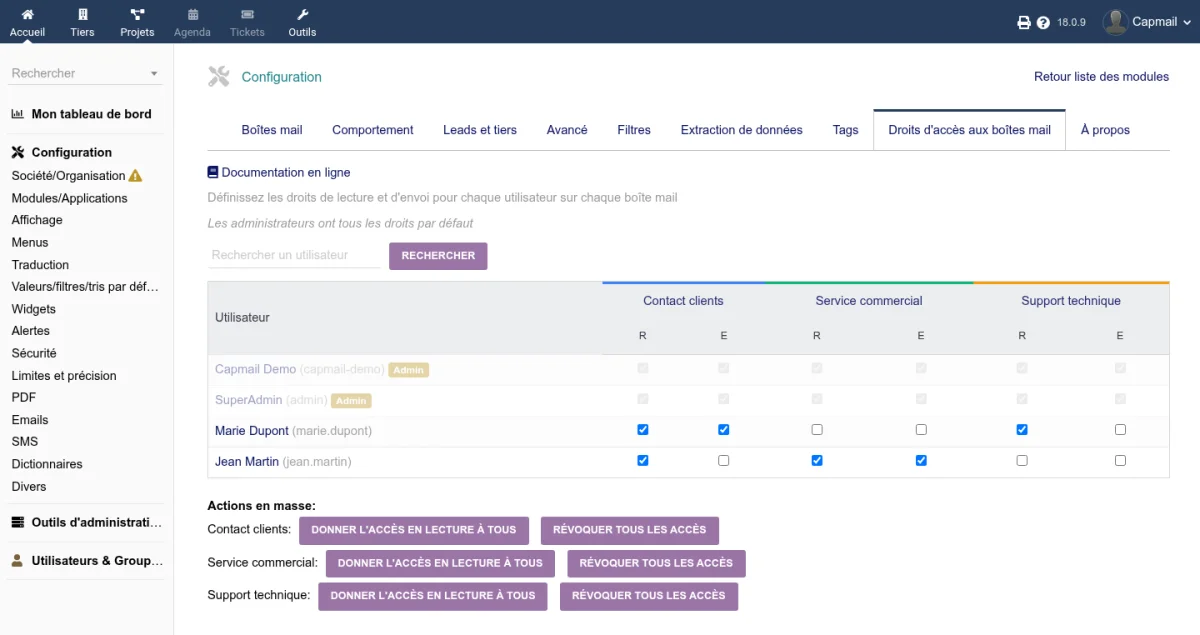
When you use several mailboxes, the rights matrix allows fine control over which user has access to which mailbox and with which rights.
Go to the module configuration, Mailbox access rights tab.
How it works
The interface is a cross table: users in rows, mailboxes in columns. For each combination, two rights are configurable:
| Right | Description |
|---|---|
| R (Read) | The user can see the emails of this mailbox |
| S (Send) | The user can send emails from this mailbox |
Dependency rules
- If the Send right is ticked, the Read right is automatically ticked (you cannot send from a mailbox without being able to read its emails).
- Administrators have all rights on all mailboxes by default. Their rights cannot be modified in the matrix.
Mass actions
Buttons at the top of each column allow you to quickly grant or revoke read or send rights for all users on a given mailbox.
Filtering
You can filter the user list by Dolibarr group or by name via the search field.
Impact on the interface
- In the email list: a user only sees the emails of the mailboxes they have read access to.
- In Lead Mode: only the mailboxes with read access are displayed.
- When sending an email (including from the standard Dolibarr forms): only the mailboxes with send access and an SMTP configuration appear in the mailbox selector.