Customers, subscriptions and mandates
Customers
Access: Bank > Mollie > Customers
Mollie customers are records that link a customer to their mandates, subscriptions and recurring payments. Each Mollie customer can be associated with a Dolibarr third party.
Customer list
Displays all customers synchronized from Mollie:
- Mollie ID (
cst_xxxx) - Name of the customer
- Associated Dolibarr third party (if linked)
- Creation date
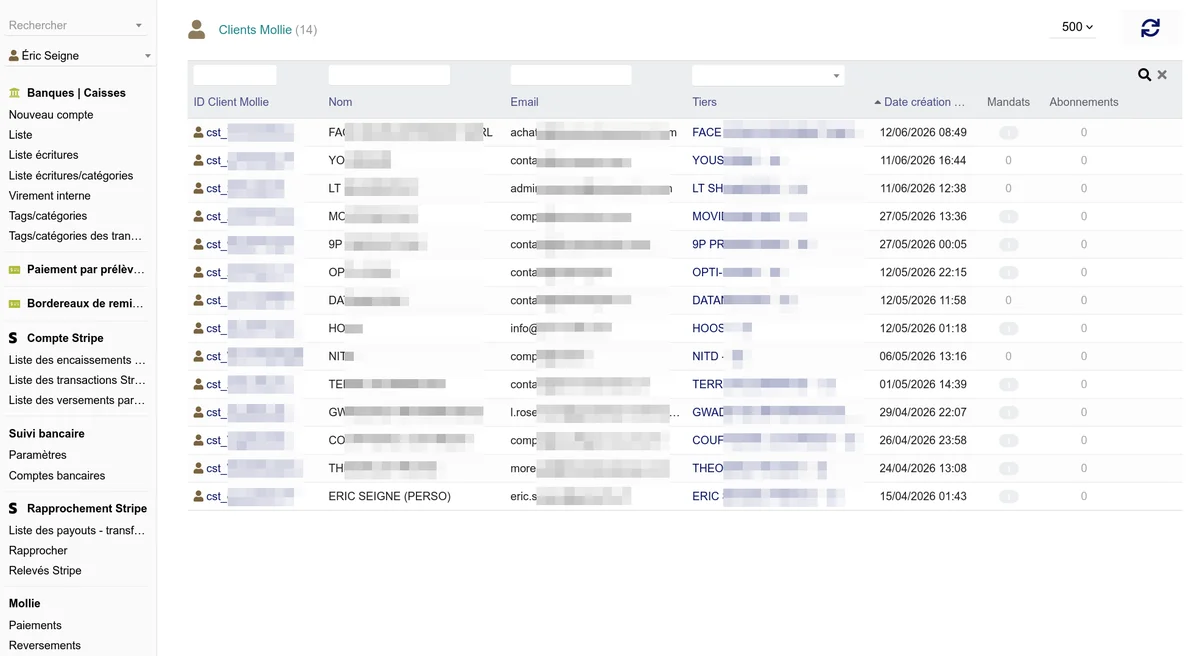
Available actions:
- Synchronize - Fetches customers from the Mollie API
- New - Creates a new customer
- Filtering and search
Customer card
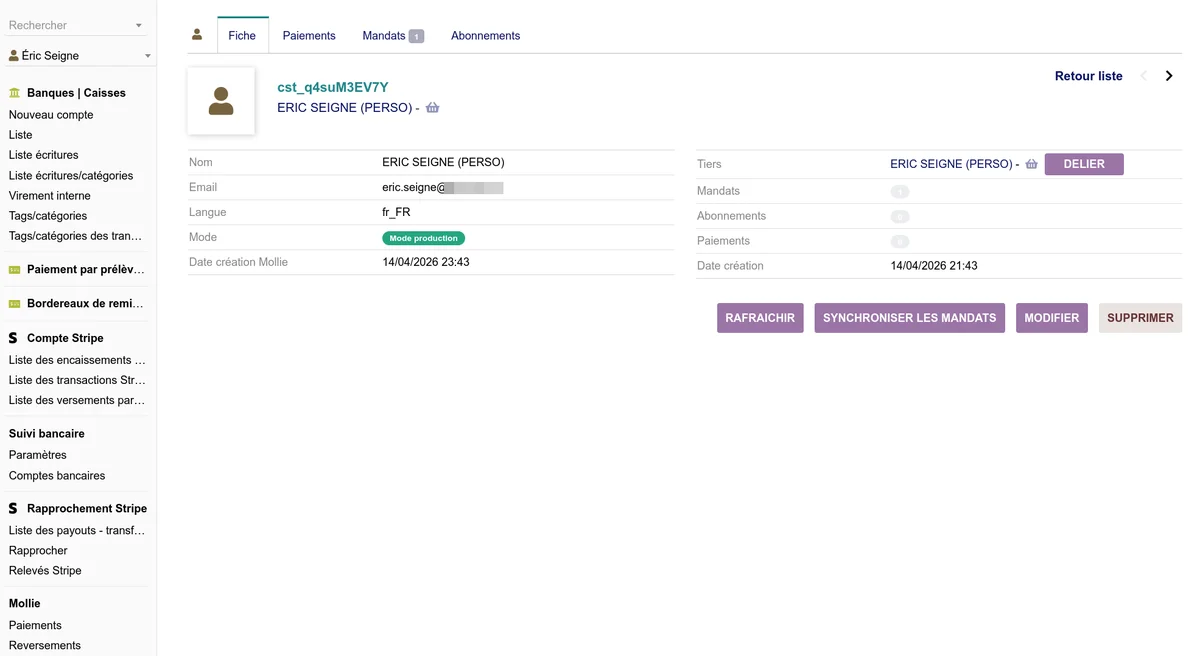
The customer card displays the details fetched from Mollie and allows:
- Refresh from Mollie - Updates the information
- Edit - Modifies the customer's name and email on Mollie
- Delete - Deletes the customer from Mollie
- Link to a third party - Associates the Mollie customer with an existing Dolibarr third party
- Unlink from the third party - Removes the association
- Sync mandates - Fetches this customer's SEPA mandates
To create a Mollie customer account from a third party record, the third party must have an email address or an international-format phone number.
Subscriptions
Access: Bank > Mollie > Subscriptions
Subscriptions allow scheduling automatic recurring payments for a customer. Mollie automatically handles the direct debit according to the defined frequency.
Subscription list
- Mollie ID (
sub_xxxx) - Associated customer
- Amount and currency
- Frequency (e.g. 1 month, 1 year)
- Status
- Next payment date

Subscription statuses
| Status | Description |
|---|---|
| Pending | Subscription created, not yet active |
| Active | Subscription in progress, payments automatically debited |
| Canceled | Subscription canceled by the user or the merchant |
| Suspended | Subscription temporarily suspended |
| Completed | All scheduled payments have been made |
Subscription card
The card displays the subscription details: amount, frequency, dates, number of remaining payments and history of payments made.
Available actions:
- Refresh from Mollie - Updates the information
- Create - Creates a new subscription for a customer with a valid mandate
- Edit - Modifies the description and amount
- Cancel - Cancels the subscription (future payments will no longer be debited)
Creating a subscription
To create a subscription, you need:
- An existing Mollie customer
- A valid SEPA mandate for this customer
- Define: amount, currency, frequency (interval), description
- Optional: start date, total number of payments
SEPA mandates
Access: Bank > Mollie > Mandates
Mandates represent the SEPA direct debit authorizations given by customers. They are required for subscriptions and recurring payments.
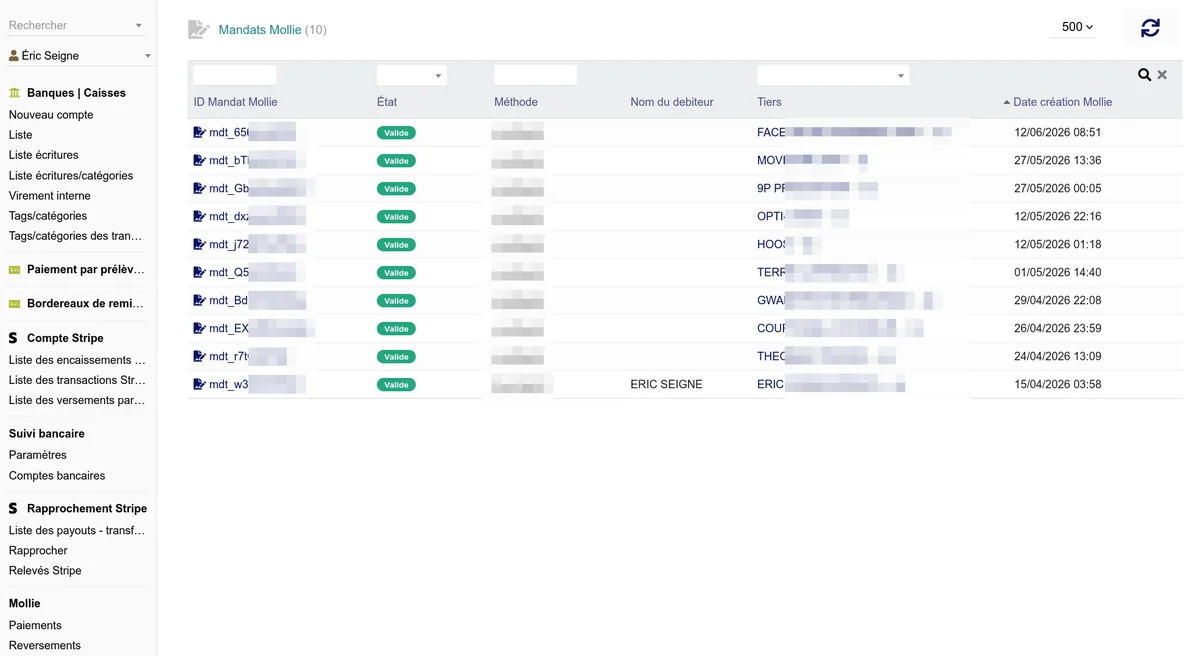
Mandate list
- Mollie ID (
mdt_xxxx) - Associated customer
- Method (directdebit, creditcard)
- Status (valid, pending, invalid)
- Mandate reference
- Signature date
Mandate statuses
| Status | Description |
|---|---|
| Pending | Mandate created, being validated |
| Valid | Active mandate, direct debits are authorized |
| Invalid | Mandate revoked or rejected by the bank |
Mandate card
Available actions:
- Refresh from Mollie - Updates the information
- Create - Creates a new mandate for a customer
- Revoke - Revokes the mandate (with confirmation)
Creating a mandate
There are two ways to create a SEPA mandate:
Method 1: Public page (recommended)
From the Mollie tab of the third party record, a secure link is available if the customer does not yet have an active mandate. Communicate this link to your customer.
The process for the customer:
- They access the personalized link
- They enter their IBAN, the account holder name and optionally the BIC
- They submit the form with the SEPA authorization text
- The mandate is created directly via the Mollie API and synchronized in Dolibarr
The mandate is immediately usable for direct debits.
Checks performed on the page:
- the IBAN is verified (check digit, country format, SEPA zone membership); a non-SEPA IBAN is refused, a direct debit mandate not being possible there
- the BIC, optional, is verified if entered
- the number of attempts is limited, so the page cannot be used to test IBANs
Record kept: for each mandate signed online, an event is added to the third party's agenda with the date, the entered name, the IP address and the masked IBAN. This is your proof of signature in case of dispute.
The link is only generated if the
PAYMENT_SECURITY_TOKENconstant is set (Setup > Other setup). Otherwise, a message indicates it in place of the link: without a secret, the address would be guessable.
Method 2: Manual creation
From the mandate card, fill in:
- Existing Mollie customer
- Method: SEPA direct debit or credit card
- Consumer name (account holder)
- IBAN of the account to debit
Important: Revoking a mandate is irreversible. Associated subscriptions will no longer be able to debit payments.