Chorus Pro
What is Chorus Pro?
Chorus Pro is the invoicing portal of the French public sector. Any company invoicing a public entity (State, local authorities, public establishments, hospitals, etc.) must submit its invoices on this portal. The Factur-X format is one of the formats accepted by Chorus Pro.
Chorus fields on invoices
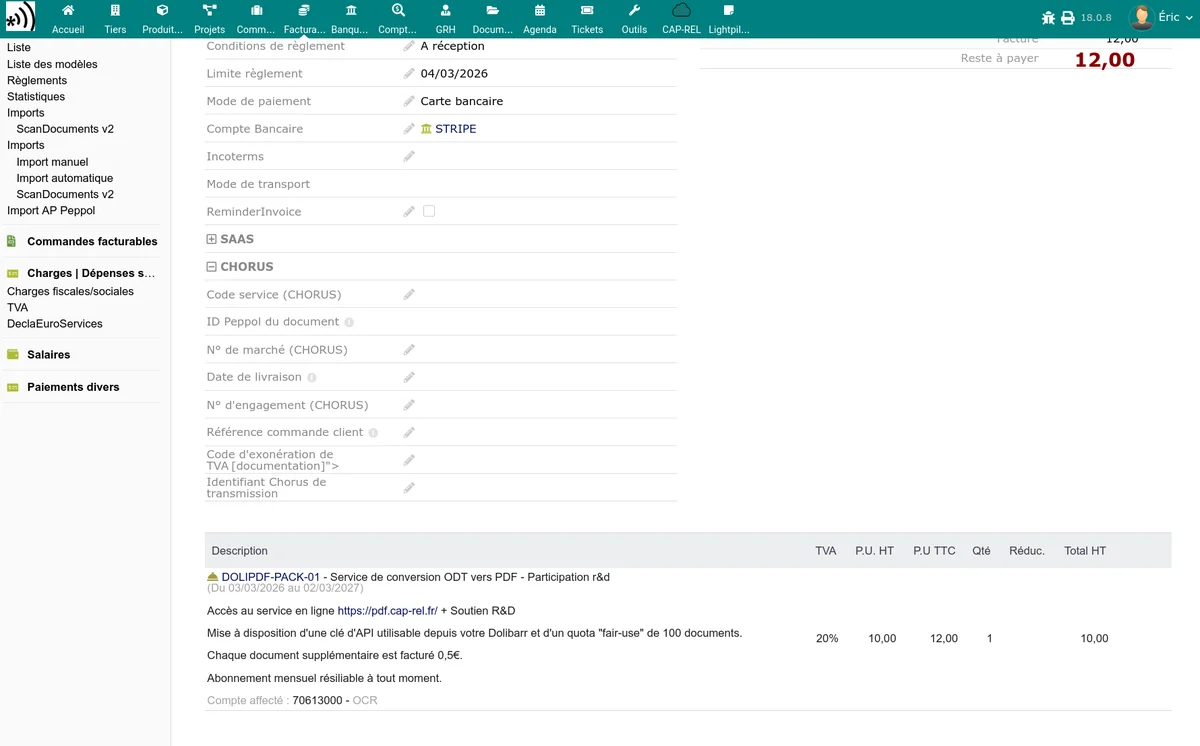
At module activation, five extra fields are added to invoice cards, in the CHORUS section:
| Field | Description |
|---|---|
| Service code | Code of the recipient service of the invoice within the public entity. This code is communicated to you by your public customer |
| Contract number | Number of the public contract or agreement to which the invoice relates |
| Purchase order number | Number of the legal commitment (purchase order) linked to the invoice |
| Chorus identifier | Tracking number assigned by the Chorus portal when the invoice is submitted. This field is filled in after submission |
| Invoice for Chorus Pro | Checkbox that adapts the XML to the requirements of Chorus Pro, see below |
The module adds other fields, outside the CHORUS section: the complete list, with their codes and display conditions, is in Extra fields created by the module.
Chorus fields on orders
The first three fields (service code, contract number, purchase order number) are also added to order cards. When an invoice is created from an order, these values are automatically carried over.
Chorus fields on invoice templates
The service code, contract number, purchase order number and the Invoice for Chorus Pro checkbox are also present on invoice templates (recurring invoices). When a template is created from a draft invoice, these values are carried over to the template, then reported on each invoice it generates. A recurring invoice destined for the public sector therefore keeps its Chorus references at each due date. See the Recurring invoices section for the detail.
Filling in the fields
- Open the invoice or order card
- The Chorus fields appear in the dedicated section
- Enter the values communicated by your public customer
- Regenerate the PDF: the Chorus information is embedded in the Factur-X XML
Warning: The service code, contract number and purchase order number are information provided by your public customer. If you do not know them, contact your interlocutor within the public entity.
<!-- Anchor referenced from chorus.md (table of the Chorus fields) --> <a id="chorus-case-facture"></a>
"Invoice for Chorus Pro" checkbox (per invoice)
Chorus Pro identifies each structure (the supplier as well as the recipient) by its 14-digit SIRET. This is a Chorus-specific requirement: the Factur-X / EN 16931 standard, on the other hand, expects the 9-digit SIREN (schemeID="0002") in the SpecifiedLegalOrganization/ID block, the SIRET being only carried by GlobalID (schemeID="0009").
These two expectations are incompatible within the same XML. As your Dolibarr can issue both invoices to Chorus Pro (public sector) and invoices to the private sector (via SuperPDP, FacturX or any other standard Factur-X channel), the choice is made invoice by invoice via the "Invoice for Chorus Pro" checkbox present in the CHORUS section of the invoice card.
| Checkbox | Content of SpecifiedLegalOrganization/ID |
Target recipient |
|---|---|---|
| Yes (Chorus invoice) | SIRET (14 digits), schemeID="0009", applied to the supplier as to the buyer. The SIRET is not duplicated in GlobalID. This XML may be refused by strict EN 16931 validators (SuperPDP, FacturX, etc.) -- only check it if the invoice really goes to Chorus |
Public sector via Chorus Pro |
| No (default) | SIREN (9 digits), schemeID="0002", SIRET present in GlobalID |
Private / B2B, any French PDP/PA or OD |
Simple rule: only check the box when the invoice is submitted to Chorus Pro. For all other invoices (private, classic B2B), leave it unchecked.
If an invoice goes through Chorus then is re-issued via another channel (or the other way round), simply regenerate the PDF after switching the checkbox: the XML is rebuilt with the corresponding rules.
Automatic detection: in addition to the checkbox, the module also switches to SIRET/Chorus mode as soon as a Chorus business field (service code, contract number or purchase order number) is filled in on the invoice. A classic B2B invoice having none of these fields, if you submit it to Chorus without checking the box, it goes out with the SIREN and Chorus rejects it (see the next section).
Automatic warning on public customers
Forgetting the checkbox on an invoice destined for an administration is the most frequent mistake, and it is only seen at Chorus rejection, several hours after submission. The module therefore now flags the case at PDF generation time:
Your customer seems to be a French public entity (invoicing via Chorus Pro), but this invoice is not marked as destined for Chorus Pro (...)
The module considers that a customer is a French public entity from its third-party card, on three indicators (only one is needed):
- its INSEE legal category: 71 (State administration), 72 (local authority), 73 (administrative public establishment), 74 (public-law legal person) ;
- its third party type: Administration ;
- its SIREN starting with 1 or 2: this is the range INSEE reserves for public bodies registered in the Sirene directory (State, local authorities, public establishments). A municipality, for example, always has a SIREN starting with 21.
The warning is purely informative: the PDF is indeed generated, it is up to you to decide whether to check the box and regenerate.
Automatically check the box for all public customers
If all your public customers go through Chorus Pro, you can avoid the invoice-by-invoice checkbox: enable the Automatically detect public entities option in the module configuration. Any invoice addressed to a customer recognized as a public entity (same indicators as above) is then generated directly with the Chorus mapping (SIRET in SpecifiedLegalOrganization/ID, invoicing framework A1).
The option is disabled by default: a public entity can also be invoiced via a PDP which expects, it, the standard EN 16931 mapping (SIREN). As long as the option is disabled, you keep control invoice by invoice and the module only shows the warning described above.
Chorus rejection "identifier must be 14" / "not referenced"
If Chorus Pro rejects your submission with a processing report (CRT) of the type:
The number of characters of the identifier (...SellerTradeParty.SpecifiedLegalOrganization.ID.value) of type identifier (SIRET) must be equal to 14. The supplier / debtor identifier of the payment request (...) is not referenced in our system. The structure (...) does not use the "Payment requests" application.
this is the case described above: the invoice was generated without checking "Invoice for Chorus Pro". The XML then contains the SIREN (9 digits) where Chorus expects the SIRET (14 digits), and Chorus cannot match this SIREN to its directory of structures (hence the "not referenced").
Procedure:
- Open the invoice, CHORUS section.
- Check "Invoice for Chorus Pro".
- Regenerate the PDF: the XML is rebuilt with the 14-digit SIRET (
schemeID="0009"), for the supplier as for the buyer. - Resubmit the invoice to Chorus Pro.
Warning -- two causes can combine. The above manipulation corrects the format error (14-digit SIRET). But the messages "not referenced in our system" and "does not use the Payment requests application" can also signal an authorization problem: Chorus Pro only processes invoices destined for the public sector (B2G). If the recipient is a private company, or if your issuing structure is not enrolled on Chorus Pro with the "Payment requests" application enabled, the invoice will remain rejected even with a correct SIRET. In this case check that the recipient is indeed a public entity referenced on Chorus and that your own structure is registered there.
Chorus rejection "the value of field ... is not allowed for the invoicing framework"
If Chorus Pro rejects your submission with a message of the type:
The value of field FichierXml.ExchangedDocumentContext.BusinessProcessSpecifiedDocumentContextParameter.ID.value is not allowed for the invoicing framework.
this is the invoicing framework (code BT-23). Two nomenclatures coexist today for this same field:
| Channel | Expected codes |
|---|---|
| French reform (B2B, PDP/PA) | B1 (goods), S1 (services), M1 (mixed) -- rule BR-FR-08 |
| Chorus Pro (B2G) | A1 (submission of an invoice by a supplier), A2 (invoice already paid), A9 (subcontractor invoice), A12 (co-contractor invoice) |
The module automatically chooses the right nomenclature: as soon as an invoice is identified as destined for Chorus Pro ("Invoice for Chorus Pro" checkbox checked, or service code / contract number / purchase order number filled in), it emits the Chorus invoicing framework A1 instead of the reform code.
If you still get this rejection:
- Open the invoice, CHORUS section.
- Check that the "Invoice for Chorus Pro" checkbox is checked (it is what triggers the switch to A1 when no Chorus business field is filled in).
- Regenerate the PDF, then resubmit the invoice to Chorus Pro.
If your situation requires another framework than A1 (subcontracting, co-contracting, invoice already paid), the value is changed in the module configuration, field Chorus Pro invoicing framework (BT-23). It then applies to all Chorus invoices. The neighboring Invoicing mode (BT-23) field concerns only non-Chorus invoices.
Chorus transmission identifier
The Chorus identifier is different from the other three fields. It is not part of the Factur-X XML: it is a tracking number that the Chorus Pro portal assigns to you when you submit the invoice. Enter it on the invoice card to ensure traceability.
Disabling the Chorus fields
If you do not invoice the public sector, the Chorus fields are useless. To hide them:
- Go to the module configuration
- Enable the Disable Chorus support option
- The CHORUS block disappears from the invoice, template invoice and order cards
The fields are not deleted from the database, only hidden. You can re-enable them at any time.
Important -- only disable Chorus if you are certain you will never need it. The three Chorus fields (service code, contract number, purchase order number) correspond to the BT-10, BT-12 and BT-13 codes of the EN16931 standard. These codes are not only for the French public sector: more and more private B2B customers (large accounts, purchasing groups, industrial ordering parties) require these references in the Factur-X XML to match the invoice with a purchase order or a contract. If one of your customers asks you to fill in a "buyer reference", a "purchase order number", a "contract number" or a "purchase order number" in the electronic invoice, leave Chorus support enabled: it is through these fields that this data goes into the XML.
Chorus fields and advanced BT-* codes
The Chorus fields are the entry point for filling in the advanced **BT-*** codes in the Factur-X XML:
| Dolibarr field | BT-* code | Role in the XML |
|---|---|---|
| Service code | BT-10 | Buyer reference (BuyerReference) |
| Contract number | BT-12 | Contract reference (ContractReferencedDocument) |
| Purchase order number | BT-13 | Buyer order reference (PurchaseOrderReferencedDocument) |
If Chorus support is disabled, these fields can no longer be entered in Dolibarr and the BT-10 / BT-12 / BT-13 codes can no longer be filled in the XML, even for a private customer who would require them.
SIREN and SIRET
For invoices destined for the French public sector, the module checks the presence of a professional identifier (SIREN or SIRET) on the customer's card. If this information is missing, an error message is displayed at PDF generation.
Make sure the third-party card of your public customer contains:
- The SIREN (9-digit identifier) or the SIRET (14-digit identifier)
- The intra-community VAT number
- The complete address (street, postal code, city, country)