Usage
The entry point
All calls go through the module's front controller pwa/api.php, with a client_credentials OAuth token obtained from smartauth. The calling webservice keeps this token in cache for its lifetime, minus a margin, and never logs it.
The dashboard
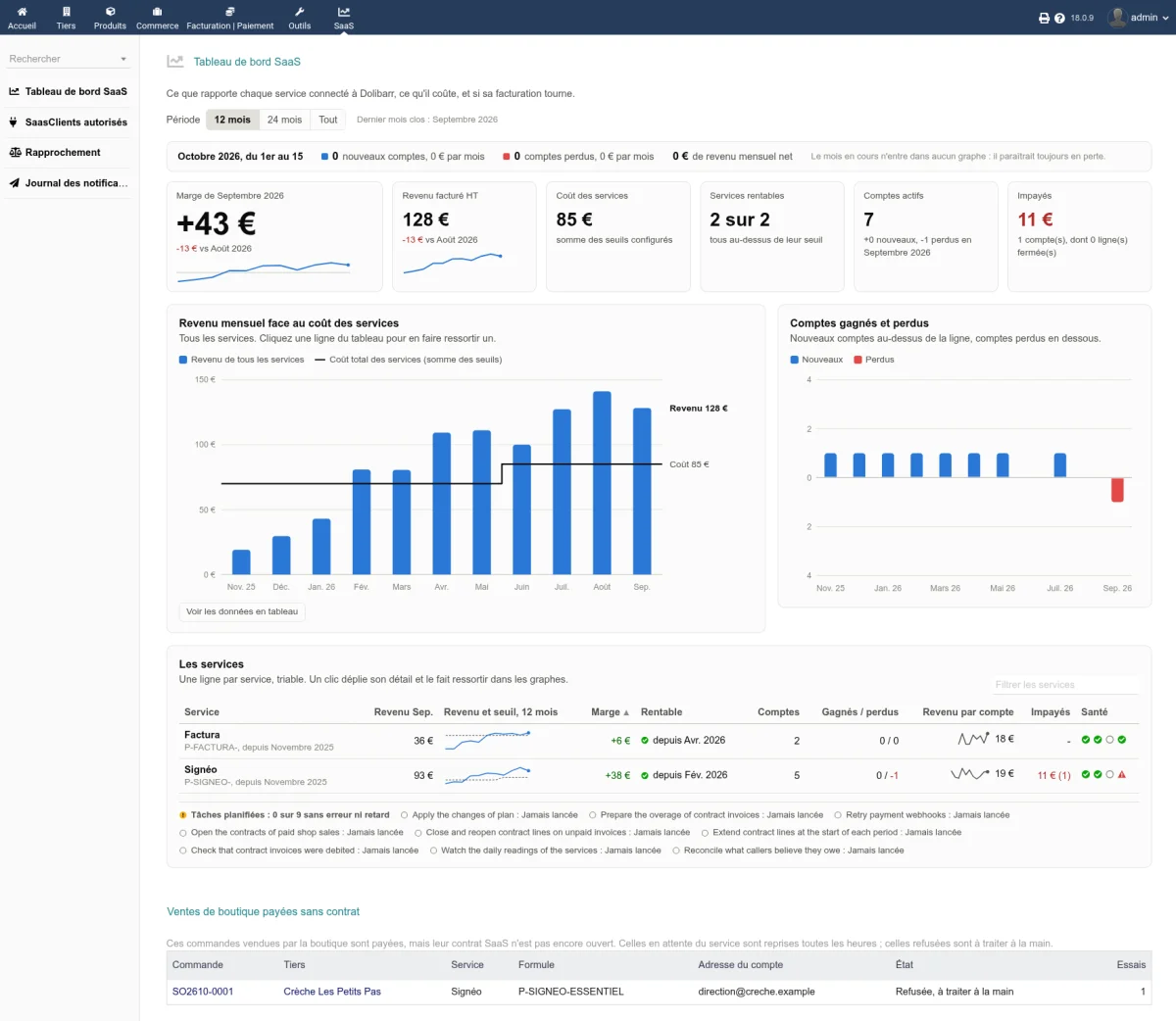
The top bar's SaaS menu opens the dashboard, which gathers on one screen what each service brings in, what it costs, and whether its billing runs. Its left menu also leads to the SaasClients, the reconciliation and the notification log. The dashboard requires the See the SaaS dashboard permission: services' margins are not for everyone to read.
A service is a SaasClient, and everything belonging to it is recognized by its product reference prefix, and by the old billing references listed in its taken-over plans:
- its revenue is the net sum of the lines of its products on validated invoices, credit notes deducted, in the month of the invoice date. A draft does not count;
- an account is a third party invoiced for this service in the month, or holding an open contract line there. It is new the first month it appears, and lost the month after its last active month. The revenue won is what a new account brings in its first month, the revenue lost what a lost account brought in its last;
- its cost is the break-even threshold in force that month;
- its unpaid are the service's validated, unpaid invoices whose due date has passed: the amount due, tax included.
A service invoiced yearly without a contract is active only in the month of its invoice: its accounts would look lost the following month. A yearly subscription therefore goes through a contract, whose open line keeps the account active.
Only closed months enter the graphs: a current month would always look like a loss. The period is chosen at the top (12 months, 24 months or the whole history).
The screen is made to follow ten or twenty services. It reads from top to bottom:
- the current month, from the 1st to today: the new accounts and the monthly revenue they bring, the lost accounts and the revenue they take away. This revenue is the value of their contract lines brought to the month, according to the contract's template invoice frequency (a yearly plan counts for a twelfth); an account without a contract counts what was invoiced to it this month. Mid-month, an account is lost only if a line of its contract was closed and it keeps none open: an invoice not yet issued does not make anyone leave;
- the last closed month's figures: the margin (revenue minus services' cost), the revenue, the cost, the number of services above their threshold, the active accounts with the new and lost ones, and the unpaid;
- the monthly revenue against the services' cost, all services combined, with the sum of the thresholds in steps. Hovering a month gives the margin and, when several services brought revenue, each one's revenue (the first five beyond five); the button at the bottom shows the same figures as a table;
- the accounts won and lost of each month, the new ones above the line, the lost ones below, with on hover the monthly revenue won and lost;
- the collections of the period, the money really in, tax included, in the month of the payment: by provider (Stancer, Mollie, Stripe, or outside a provider for a payment entered by hand) and by payment mode (card, direct debit, transfer...), with each one's share, the number of payments and the rejections (payments taken back afterwards: rejected direct debit, card dispute). The overdue unpaid are sorted there by the payment mode requested on the invoice. At the top, the critical points: a provider carrying more than 70% of the collections, a channel rejecting more than 5% of what it collects, a provider that collected in previous months and collected nothing in the last closed month. The button at the bottom details each provider and mode pair;
- the services table, one line per service: the month's revenue and its curve over twelve months against the threshold, margin, months since it has been profitable without interruption, accounts won and lost, revenue per account and its curve, unpaid, and four state dots (daily reading, lines missing from the reading, reconciliation, notifications). It sorts on each column, from least profitable to most profitable by default, and filters by name or by prefix;
- a service's detail, by clicking its line: its revenue against the threshold month by month with its accounts won and lost, the gap to the threshold, the cumulated margins since the first threshold and the month when the startup losses were recovered, the evolution of the revenue per account over twelve months, its unpaid and the lines closed by the closing rule, and the full text of each state. The same click highlights the service in the figures and graphs at the top; a second click goes back to all services;
- the module's scheduled tasks, under the table: the last run of each, in error, late or disabled.
The states follow the same rules as the tasks that send the alerts: the dashboard sees nothing they do not see, it shows it without waiting for an e-mail. It calls no webservice; the reconciliation displayed is the one the daily task kept.
The outgoing verbs
Each API operation is named here as a verb. The module exposes twelve.
| Verb | Path | Role |
|---|---|---|
GET catalogue |
catalogue |
Returns the product records of the caller's prefix, as well as MAIN_MAX_DECIMALS_UNIT |
POST tiers |
tiers |
Creates a customer's third party, or finds theirs; idempotent on the SIREN |
POST commandes |
commandes |
Creates an order and its lines, with its contract intent where applicable; idempotent on the act reference |
POST validation |
commandes/{ref}/validation |
Validates the order and returns its payment link |
GET règlement |
commandes/{ref}/reglement |
Returns the payment state and replays the unacknowledged notification |
POST annulation |
commandes/{ref}/annulation |
Cancels an unpaid order |
POST avoir |
commandes/{ref}/avoir |
Issues a partial credit note on a paid act |
GET facture |
commandes/{ref}/facture |
Returns the invoice born from the order, PDF included |
GET contrat |
contrats/{ref} |
Returns the contract, its status and its lines of the caller's prefix |
POST changement |
contrats/{ref}/changement |
Requests a plan change, effective at the start of the next period (the plan change) |
DELETE changement |
contrats/{ref}/changement |
Cancels a plan change that has not taken effect yet |
POST relevés |
releves |
Records the caller's daily consumption reading of contract lines (the daily reading) |
The GET facture verb exists so that the calling webservice can file the invoice at its own customer's, where the customer files what they receive. The document is produced on demand if it does not exist yet, and arrives encoded with its fingerprint, which the caller must verify: a document truncated on the way is a document the customer will not be able to open. The invoice is reached through the order and never by its own name, and no verb lists a third party's invoices.
The credit note does not give the money back
The credit note verb issues and validates the credit note invoice: it is an accounting entry, and not one euro moves. The refund is entered in Dolibarr, on the credit note's record, by the person who keeps the accounts. A credit note can also be turned into a discount, to deduct from an upcoming invoice rather than pay back.
The module therefore says both things rather than one:
- the credit note verb answers
refund_state: pendingandrefunded: false. A webservice announcing a refund to its customer on this response would announce something that did not happen; - the payment verb then lists the order's credit notes with their state:
pendingas long as nothing came back,refundedwhen the money was returned,discountedwhen the amount was turned into a discount. This is how a webservice learns what became of the credit note it requested.
The SaasClient record, on the Dolibarr side, lists the credit notes that have returned nothing yet: it is the only screen gathering them, and a customer's money waits for a human to see it there.
Four rules hold for all verbs:
- Outside its perimeter, the caller gets a uniform 404: the object is declared nonexistent to them.
- The price always comes from the product record, and a service without a price is refused.
- A line reads "7 months at 1.65833": a whole quantity, multiplied by the record's price.
- The payment link is returned by the validation verb, and is never rebuilt at the caller's.
Customers that are not companies
The SIREN is a company's identity, and a service sold to individuals has none to declare. The POST tiers verb therefore accepts, failing a SIREN, an e-mail address: it then identifies the customer, and the caller vouches for it.
The two regimes do not look for duplicates in the same place, and the difference matters:
- With a SIREN, the search runs through the whole third party file. A company that is a customer of two of your services keeps a single third party and a single accounting.
- With an e-mail address, the search is limited to the calling service's third parties. The same address declared by another service therefore opens a second third party: a generic address, that of a firm or a switchboard, must not bring together two customers who have nothing to do with each other.
One exception to this last rule, decided by the instance and not by the module: when Dolibarr is configured to require a unique e-mail address per third party (option SOCIETE_EMAIL_UNIQUE), the instance has already ruled that an address is worth one third party, and the existing third party is attached to the caller rather than duplicated.
On a found third party, neither the name, nor the e-mail address, nor the SIREN are rewritten: the calling service finds its customer, it does not redefine them. An accounting reference is not taken back from an order form. The billing address is the exception and follows the customer, since a move must appear on the next invoice; a call carrying none leaves the third party's in place.
Negotiated prices
A SaasClient selling the same subscription at different prices per customer does not need one product record per customer. Dolibarr can give several prices to one record: these are the price levels, enabled by the PRODUIT_MULTIPRICES option. Each record then carries a price per level, and each third party carries the level it is billed at. Level 1 is the public price.
The price thus stays a commercial property of the customer, managed in Dolibarr, and the webservice keeps declaring only "such product, such quantity".
Three things change in the verbs, and nothing else:
GET cataloguepublishes each record's grid next to its base price, with the number of configured levels. A caller ignoring the levels keeps reading the base price without changing anything on its side.POST tiersaccepts and returns the third party's level. On an already existing third party, the level is read and never rewritten: a customer's ongoing conditions are decided in Dolibarr, and a replayed call must not undo a price granted by hand. To reposition a customer, the caller explicitly asks for forcing.POST commandesvalues each line at the order's third party level.
Two precautions are worth knowing:
- A level without a price is not a level at zero. The catalog distinguishes the two, and an order carrying an unfilled level is refused rather than invoiced at zero.
MAIN_MAX_DECIMALS_UNITapplies to each level, not only to the base price: on an instance rounded to 2 decimals, a monthly price of 1.65833 becomes 1.66 at all levels at once.
Finally, the module applies the order's third party level. When a webservice invoices a company to a reseller, it is therefore up to it to designate which of the two carries the order: the module does not choose in its place, and never deduces a level from an amount.
The reconciliation: what the webhook cannot see
The notification channel has a blind spot it cannot cover alone: the webservice that pushes its acts is also the one that decides there is nothing to push. A scheduler that does not run opens no act, so no order, so no invoice, and raises no error. The case is not theoretical: an instance ran four months that way, serving every screen flawlessly.
The Reconciliation tab therefore reads, for a closed month, what the webservice estimates it is owed, and confronts it with what this instance actually invoiced. It invoices nothing, corrects nothing, writes nothing: it names discrepancies.
What the module expects from the webservice
One reading, under the feed URL declared on the SaasClient record:
GET <feed url>/setup-events?month=YYYY-MM
Authorization: Bearer <reading token>
The response carries a data array, one line per event of the month. The module reads only four things there, and ignores the rest:
| Field | Role |
|---|---|
reference |
The event's key at the webservice, displayed as is |
act.reference |
The act reference actually recorded, or null if none |
billable |
False for an event the webservice decided not to bill |
company_name, siren, type, effective_on |
Optional, only to make a line readable |
It is act.reference that does all the work: it is the same value as the act reference pushed to the order verb, so the only one both sides share.
The feed must refuse a month still in progress: a partial response that a second reading would contradict is worse than a refusal.
The three discrepancies
- Billable event with no recorded act: the webservice acknowledges it should have billed, and its own billing kept nothing of it. This is the discrepancy of the stopped scheduler.
- Recorded act with no order here: the act exists at the webservice and never arrived on this channel. The customer owes something nobody invoiced.
- Order with no claimed event: an order of the month whose act reference the webservice does not recognize. The rarest, and the one that costs a customer relationship.
A discrepancy is looked at, it is not regularized automatically: the decision to catch up is commercial, and the module never invoices on its own authority.
A daily scheduled task reads the closed month of each SaasClient that declares a feed and logs its discrepancies, one line per discrepancy. It also keeps its reading, discrepancies included, or the reason the feed could not be read: that is what the dashboard shows, without calling any feed itself. The screen, for its part, allows rereading any past month on demand.
The payment webhook
When a payment is accepted on the invoice of an order coming from the API, the module sends the webservice a payment.accepted notification, HMAC-SHA256 signed, to the webhook URL declared on its record. The signature travels in the X-Dolibarr-Signature header and is computed over the raw body of the message, with the client's own secret. The payload contains the act reference, the third party, the amount and the date of the payment, but never the payment link.
This signature alone does not date the message: an intercepted body would stay valid indefinitely. Each notification therefore also carries three headers:
| Header | Content |
|---|---|
X-Dolibarr-Timestamp |
sending time, in Unix seconds |
X-Dolibarr-Push-Id |
notification identifier, the same at each replay |
X-Dolibarr-Signature-Timestamped |
HMAC-SHA256 of timestamp.identifier.body with the same secret |
A receiver verifying X-Dolibarr-Signature-Timestamped refuses a message whose timestamp differs by more than a few minutes from its clock, and ignores an already processed identifier. X-Dolibarr-Signature is still sent as is for receivers not yet reading the new headers.
What Dolibarr decides alone
A collected payment is not the end of the story, and what is decided next in Dolibarr would otherwise never reach the webservice: it would keep serving a subscription whose money went back, without any error being raised anywhere. Three more notifications, all signed and replayable like the first:
| Notification | When |
|---|---|
payment.refunded |
A credit note of the order is refunded to the customer |
payment.canceled |
An already notified payment is deleted from Dolibarr |
order.canceled |
An order is cancelled or deleted from Dolibarr |
All carry the same markers as the first - act reference, third party, product references - and the date of the event.
Two choices deserve to be known, because they stand out by their absence:
- a credit note merely issued triggers nothing. Nothing has moved for the customer as long as the money has not come back, and it is the refund that is the event, not the accounting entry. The payment verb tells at any time where a credit note stands;
- a cancellation requested by the API is not notified back to the one who just requested it: they would receive a notification in answer to their own call, and would wait meanwhile for a round trip to their own server;
- deleting a draft triggers nothing. A draft was never offered for payment: its deletion frees the act reference, which the webservice can reuse. A validated then deleted order sends
order.canceledin a single attempt, because the notification disappears from the log with the order and can therefore not be replayed.
A lost notification is not recovered by a simple read. Three ways allow resending it: the payment state verb replays it at the caller's request, the button of the Payment notification log tab replays it from Dolibarr, and the module's cron automatically retries the failed ones.

Contract lines
The Dolibarr contract carries the truth of a recurring subscription: its lines open, extend at the start of each period and close on a noted unpaid. The webservice keeps a mirror of these lines and the module warns it at each change, on the same webhook URL, with the same secret and the same X-Dolibarr-Signature as the payment.accepted notification.
A line belongs to a SaasClient when its product reference starts with the prefix declared on its record, the same rule as for the catalog and orders. If two prefixes fit, the longest wins. A line belonging to no active SaasClient triggers nothing, and a contract mixing two services' products notifies each for its own lines only.
Overage lines are never shown to the webservice: no notification goes out for them, and GET contrats/{ref} does not serve them. They are billing lines; the webservice only tracks the plan line, and would otherwise take them for a second subscription of the same account.
The events
| Notification | When |
|---|---|
contract.line.opened |
A line is activated for the first time |
contract.line.extended |
The end date of an open line moves back, for example at the start of the next period (the extension) |
contract.line.closed |
A line is closed |
contract.line.reopened |
A line whose closing was notified is activated again |
contract.line.payment_overdue |
A debit failure is noted on an unpaid invoice of the line (see the closing rule) |
contract.line.payment_settled |
An invoice announced unpaid for the line is paid |
contract.line.invoiced |
An invoice billing the overage of a closed month is validated (month invoice or closing invoice): month (YYYY-MM) and invoice_ref, once per plan line, invoice and month |
The body triggers, the state is reread: it names the line and what happened to it, with the status and end date it had at that moment, and nothing more.
A line notification is sent only once the transaction that produced it is finished. Dolibarr triggers a line's activation and closing before recording the change: a webservice rereading the contract right away would find it as it was, a still-inactive open line. The notification is therefore recorded with the transaction, then sent after the commit, at the latest at the end of the processing. A cancelled transaction sends nothing. What does not go out is picked up by the notification retry.
{
    "event": "contract.line.opened",
    "contrat_ref": "CT2610-0004",
    "line_id": 12,
    "product_ref": "P-SCIFAC-ABO",
    "status": "open",
    "end_date": "2026-11-12",
    "event_date": "2026-10-12",
    "thirdparty_id": 31,
    "options": {
        "quota": {
            "documents": {"included": 1000, "soft": 500, "hard": 550, "overage_pack": "P-SCIFAC-PACK-200"}
        }
    }
}
A line's status is inactive, open or closed, dates are days (YYYY-MM-DD) and thirdparty_id designates the third party, as on order notifications. For contract.line.opened, event_date is the line's opening date, which can be in the future: the line of a deferred contract is opened as soon as payment happens, from the 1st of the following month.
options carries the contract options, read at the moment of the event, identical to those of the read verb: null when the contract has none. When their text is unreadable, options is null and options_error gives the reason.
A few rules keep the webservice from receiving noise:
- an event is a change seen from the webservice. Activating an already notified open line, or closing an already notified closed line, notifies nothing. Closing then reopening the same line twice in a day does produce two closings and two reopenings;
- only an end date that moves back is an extension. It is compared to the last end date notified for the line. An advanced date is not notified: the end date is a safety net for the webservice, and it is the closing that stops a line. An extension of a closed line is not notified either;
- the extension follows the line's modification in Dolibarr, from the contract record or by the code that updates the line with Dolibarr's methods. A module shifting the end date by a direct SQL query, without trigger, produces no notification: the webservice then rereads the date at the next event or through the read verb.
These notifications enter the same log as those of orders. A notification refused by the webservice stays failed there and the module's cron retries it, like the others, up to the maximum number of attempts; the button of the Payment notification log tab also replays it from Dolibarr. The replayed body is that of the original send. As notifications can thus arrive out of order, the webservice does not hold the body for the final state: it rereads the contract.
Rereading the contract: GET contrats/{ref}
The verb returns the contract's status, the identity of the account it carries and its lines of the caller's prefix, without the others:
{
    "ref": "CT2610-0004",
    "status": "validated",
    "thirdparty_id": 31,
    "account": null,
    "options": {
        "quota": {
            "documents": {"included": 1000, "soft": 500, "hard": 550, "overage_pack": "P-SCIFAC-PACK-200"}
        }
    },
    "lines": [
        {
            "id": 12,
            "product_ref": "P-SCIFAC-ABO",
            "status": "open",
            "date_start": "2026-10-12",
            "date_end": "2026-11-12",
            "date_opened": "2026-10-12",
            "date_closed": null,
            "payment_overdue": null,
            "invoices": [{"month": "2026-10", "invoice_ref": "FA2611-0042"}]
        }
    ]
}statusisdraft,validatedorclosed;date_startanddate_endare the line's planned dates,date_openedanddate_closedits actual opening and closing dates;accountis the identity of the service account posed on the contract. It isnullas long as the contract carries none.optionsis the object of the contract options, its quotas first. It isnullwhen the contract carries none. When their text does not read,optionsisnullandoptions_errorgives the line and the reason; the incident is logged as a warning.payment_overdueisnull, or describes the line's debt when an invoice billing it had a debit failure and stays unpaid (see the closing rule).invoiceslists, over twelve sliding months, the invoices that billed the overage of each closed month where the line was in service:monthandinvoice_ref, sorted by month. It is the same information ascontract.line.invoiced, for a webservice that missed the event; it keeps it next to the month's final reading (a reseller's consumption history).
An unknown contract and a contract carrying no line of the caller's prefix both answer 404, without saying anything of their existence. A call without a token gets 401. There is no creation verb: a contract is born from an order, never from a call.
The closing rule
Access is extended on presumption of payment and cut only on a noted unpaid. A daily scheduled task of the module, Close and reopen contract lines on unpaid invoices, applies a single rule to the SaasClients' contract lines: a line whose invoice is still unpaid more than seven days after its first noted debit failure is closed, and it is reopened when the invoice is paid.
The seven-day grace period is a module constant, the same for all SaasClients: "a few days", decided on 2026-10-08, the exact value still open. It is not set from the interface.
What counts as a failure
Two traces, and only two:
- an agenda event of the invoice whose code has the form
AC_PAYMENT_<PROVIDER>_KO, the convention the Dolibarr core applies to Stripe (AC_PAYMENT_STRIPE_KO). The code is recognized by its form, without a provider list:AC_PAYMENT_STANCER_KOorAC_PAYMENT_MOLLIE_KOwill count as soon as those modules set them. A code of another form, likeAC_STANCER_PAYMENT_KO, does not count; - a rejected native direct debit line (status "rejected" of the direct debit order's line), dated by the rejection date entered in Dolibarr.
The first failure is the oldest of these events for the invoice: a new refusal the next day does not push the closing date back. A rejection without a date is an incomplete record: the contract is flagged as an error in the task's summary, and nothing is closed on an assumption.
What never closes
- an invoice that had no failure, whatever its age. A SEPA direct debit leaves several days after the invoice and its rejection comes back even later: this silence is not an unpaid;
- an invoice that is not the contract's. Only ordinary invoices linked to the contract count (the linked objects of the contract record, in either direction): the order's invoice, linked at its creation, and those a template invoice or contract grouping produces. An unpaid invoice of the same third party not linked to the contract, like Stancer's rejection fee invoice, is never read;
- an invoice that does not bill the line. An invoice linked to the contract applies to the lines whose product it carries; an invoice with no product applies to all the contract's lines;
- an abandoned or partially paid invoice: it is no longer due, nor paid; a person decides what happens next.
Closing and reopening
The line is closed by Dolibarr, as from the contract record: the webservice receives contract.line.closed. Its comment starts with SMSB-UNPAID # followed by the invoice identifier, then the reason in clear text, and an agenda event Line closed is placed on the contract with the invoice, the date of the first failure and the grace period.
When this invoice is paid, the line is reopened and the webservice receives contract.line.reopened, preceded by contract.line.payment_settled. Full payment of the invoice triggers the rule at once, without waiting for the next day's task: the reopening arrives within the minute. An agenda event Line reopened is placed on the contract. The line stays closed as long as another invoice of the line has passed its grace period.
Only lines the rule closed are reopened. Dolibarr rewrites the line's comment at each closing and each activation: a line closed by hand never carries the SMSB-UNPAID mark, and a line reopened by hand loses it. A line closed by a person therefore stays closed, even when its invoice is paid. Conversely, a person who reopens a line whose invoice is still unpaid beyond the period will see it closed again the next day: to keep access, the invoice must be paid or abandoned.
The rule stores nothing: it is recomputed every day from the invoices, their failures and the lines. Running it twice produces neither a second closing nor a second notification. Each closing and each reopening is logged (dol_syslog), and a contract in error is logged then skipped without stopping the others; the task returns a summary (contracts examined, debts announced, lines closed, payments, lines reopened, contracts in error).
Warning the webservice as soon as the failure happens
The webservice does not wait for the closing to know an invoice is unpaid. As soon as a failure is noted on an invoice of the still unpaid line, it receives, once per line and per invoice:
{
    "event": "contract.line.payment_overdue",
    "contrat_ref": "CT2610-0004",
    "line_id": 12,
    "product_ref": "P-SCIFAC-ABO",
    "status": "open",
    "end_date": "2026-11-12",
    "event_date": "2026-11-14",
    "thirdparty_id": 31,
    "invoice_ref": "FA2611-0042",
    "amount_due": 29.88,
    "first_failure_date": "2026-11-13",
    "closing_date": "2026-11-20"
}amount_dueis the invoice's amount due, tax included;first_failure_dateis the day of the first noted failure;closing_dateis that day plus the grace period: the day the line will be closed if the invoice is still unpaid.
When the invoice is paid, it receives, once only too:
{
    "event": "contract.line.payment_settled",
    "contrat_ref": "CT2610-0004",
    "line_id": 12,
    "product_ref": "P-SCIFAC-ABO",
    "status": "open",
    "end_date": "2026-12-12",
    "event_date": "2026-11-16",
    "thirdparty_id": 31,
    "invoice_ref": "FA2611-0042"
}
payment_settled goes out at the invoice's payment, whether the line was closed in between or not; if it was, contract.line.reopened follows. Payment triggers the notification within the minute, and the daily task sends those that would have been missed. The idempotency key is the invoice: the same debt is never announced twice for the same line.
The GET contrats/{ref} verb returns the same debt in each line's payment_overdue field, recomputed at each read, then null once the invoice is paid:
"payment_overdue": {
    "invoice_ref": "FA2611-0042",
    "amount_due": 29.88,
    "first_failure_date": "2026-11-13",
    "closing_date": "2026-11-20"
}
If several invoices of the line are in default, it is the one with the oldest failure.
What the webservice does with these notifications
- during the grace period, it keeps serving the customer. A failure is not an end: the payment module retries the debit, and the customer can pay;
- it can display an "unpaid invoice" banner to its users, with the closing date, or put the service on pause to encourage payment: that is its choice;
- it never cuts authentication, account reading or payment, neither during the grace period nor after the closing: a customer who can no longer log in can no longer pay;
- it cuts at the line's closing, on
contract.line.closed, and restores the service oncontract.line.reopened; - it rereads the contract rather than holding the body for the final state: notifications can arrive out of order when one of them is replayed.
What the payment modules set today
The rule reads the traces the payment modules leave. To date, the Dolibarr core sets AC_PAYMENT_STRIPE_KO for Stripe, and native direct debit records its rejections. The Stancer and Mollie modules do not set a code of the form AC_PAYMENT_<PROVIDER>_KO yet.
Meanwhile, a fallback: a contract invoice debited by Stancer or Mollie (its payment mode and the provider's bank account), still unpaid ten days after its payment due date (see the debit check), counts as a first noted failure on that tenth day; the grace period then runs as for a traced failure. Ten days let a SEPA direct debit's payment through. The fallback drops for a provider as soon as a trace AC_PAYMENT_STANCER_KO (or AC_PAYMENT_MOLLIE_KO) exists on the instance: its own traces then decide alone.
The daily reading
A webservice selling a metered subscription pushes every day, through POST releves, the consumption of all its contract lines: totals since the start of the quota period, never what happened since the day before, and the billable overage it computed itself. The module records, it does not count.
{"as_of": "2026-10-13", "page": 1, "pages": 1,
 "lines": [
   {"contract": "CT2610-0042", "line_id": 118,
    "period": {"start": "2026-10-01", "end": "2026-10-31"},
    "final": false,
    "metrics": [
      {"metric": "documents", "kind": "flow", "since": "2026-10-01",
       "consumed": 87, "included": 50,
"product_ref": "P-OCR-DOC-SUP-STD", "billable": 37}]}]}as_ofis the last counted day, in Paris time, never a future day.- One call carries 500 lines at most; beyond that, the day is split into several calls of the same
as_of, numberedpageoverpages(1 over 1 by default). kindisflow(period consumption) orstock(what the customer holds, counted from the 1st of the month).consumed,includedandbillableare positive integers;product_refis empty for a metric that bills nothing.detail, optional, gives the consumption of each account of a reseller's group (account,consumed).- A line without a quota arrives with
metrics: []: it is present. - Each reading replaces the previous one of the same line and the same day: a replayed call counts nothing twice, and a missed day is caught up the next day.
- A final reading (
final: true,as_ofon the last day of a closed month) is never replaced. Resent identically, it answersfinal_recordedagain; with a different value, it is refused, logged and reported with both values. Correcting an already billed month goes through a credit note made by hand.
The 200 response gives the fate of each line:
{"as_of": "2026-10-13", "page": 1,
 "lines": [
   {"line_id": 118, "status": "accepted"},
   {"line_id": 119, "status": "final_recorded"},
{"line_id": 120, "status": "refused", "reason": "final_differs"}]}| Status | Reason | Meaning |
|---|---|---|
accepted |
Non-final reading recorded | |
final_recorded |
Final reading recorded, or resent identically | |
refused |
final_differs |
A different final reading already exists |
refused |
unknown_line |
No line of this number in the caller's perimeter |
refused |
invalid |
Malformed line, the reason in message |
A refused line does not block the others. A line of another customer, of another contract than the named one, or an overage line answers unknown_line like a line that does not exist: the response never says a number exists elsewhere. The real reason is logged, and reported once per call to the alert address. Code 422 is reserved for a call unreadable as a whole: as_of missing, invalid or future, page and pages inconsistent, lines not a list, more than 500 lines.
Readings are recorded in three tables created at activation: an existing installation must re-enable the module.
The SaaS tab of the contract record
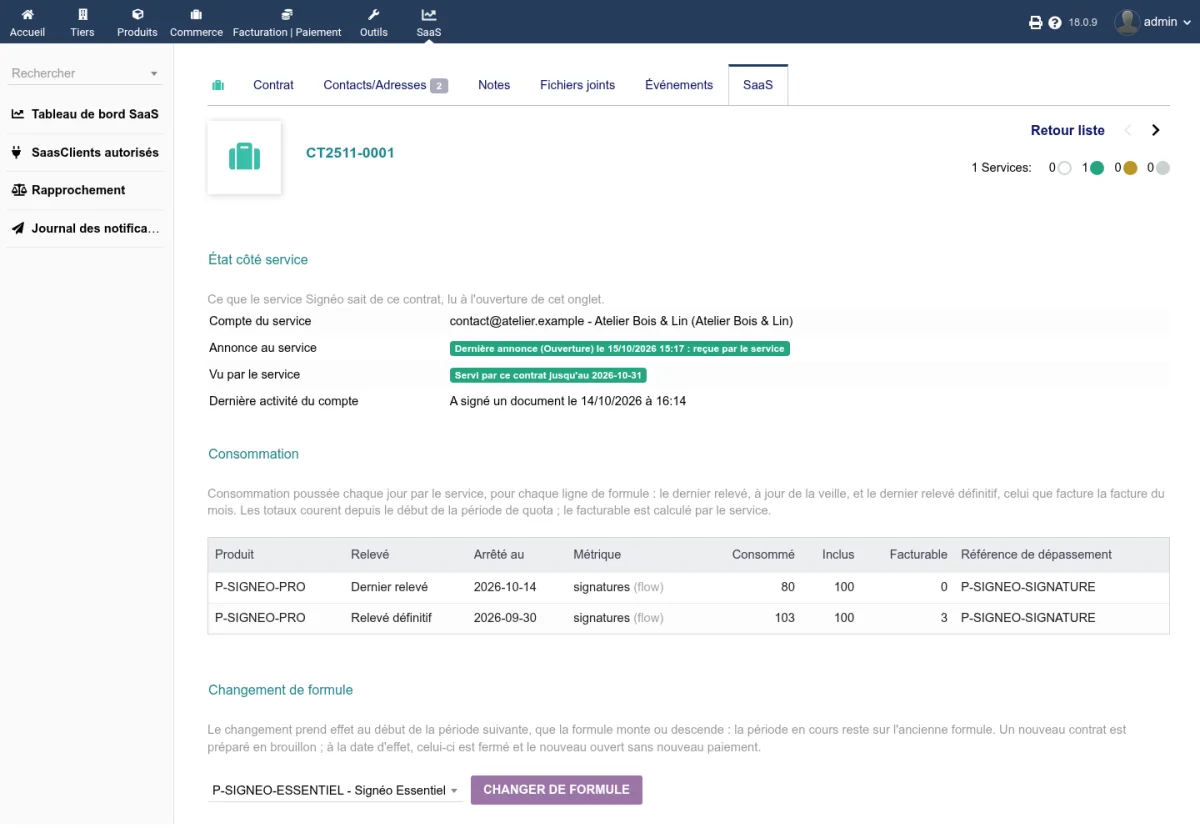
The contract record's SaaS tab (formerly Consumption) first answers the question of who just posed the contract: did the service properly receive this contract? The State on the service side box, read when the tab opens, gives:
- the service account the contract carries, as the service describes it (e-mail, name, company), or a warning if the contract carries none;
- the last announcement to the service on the contract's lines (opening, extension, closing...): received by the service, waiting to be sent, or not received with the number of attempts, the automatic retry taking care of it;
- what the service sees: the account is served by this contract, and until when; or by another contract; or by none; or the service does not know the account, or does not answer;
- the account's last activity ("signed a document on 2026-10-14 at 18:14"), when the service communicates it in its directory. It says the account is alive, without showing any content.
Nothing else is read from the service: the consumption remains pushed by it every day (see "The daily reading").
Below, the consumption: for each plan line, the last reading received (up to date as of the day before) and the last final reading, the one the month's invoice bills: metric, stopped on, consumed, included, billable and overage reference. You see the customer's spend before the invoice goes out. A line without a quota is indicated as such; overage lines do not appear there, their quantity is on the invoice. The tab follows the right to read contracts; an existing installation must re-enable the module to see it.
Silence shows in three days
The daily sending is also a heartbeat. A daily scheduled task, Watch the daily readings of the services, watches each service that has open contract lines:
- a service without a reading for three days is reported to the alert address (it concerns no customer), on the third day then every week as long as the silence lasts. A service that never sent anything is counted from the opening of its first line;
- an open line absent from a fully received day (all its pages) is reported, once a day and per contract, to the people of the configuration. It is almost always a misattached account, which would never be billed. A line refused by the day's reading was well sent: it counts as present. A day missing a page is not examined.
The invoice of the closed month
The invoice generated on the 1st carries the subscription of the month starting and the consumption of the closed month. This consumption comes from the final reading of the closed month, and from it alone: no final reading, no invoice.
For each contract line in service during the closed month and each metric of its final reading:
- a flow is billed for its
billable, minus what was already billed on the same quota period. For a monthly contract, the period is the month, and nothing is deducted. For a yearly contract, the overage is billed every month: the already billed is reread in the contract's validated invoices, lines of the overage reference dated from previous months of the period, credit notes deducted; - a stock is billed for the month's
billable, without cumulation.
A daily scheduled task, Prepare the overage of contract invoices, runs before Dolibarr's invoice generation. For each template invoice that reached its generation date:
- a final reading is missing: the template invoice is suspended, a Invoice held event stays in the contract's agenda and an alert goes out. The service, for its part, stays served and extended;
- all the final readings are there: the quantities are reported on the contract's overage lines and on the same product's line of the template invoice, and a template invoice the module had suspended is reactivated. A template invoice suspended by hand stays suspended.
At the invoice's creation, the module checks again: a missing final reading refuses the invoice (Dolibarr retries the next day, even if someone reactivated the template invoice by hand), and the invoice's overage lines receive the reading's quantities, dated from the consumed month. The invoice is therefore right whatever the order of the tasks.
A reseller's invoice is detailed by customer. A reseller's line reading carries, for each metric, the consumption of each account of its group (detail). Under the overage line it specifies, the template invoice receives a text line without amount per account ("customer A: 8"), in the order of the final reading; the group's line alone carries quantity and price, the included being common to the group. These lines are replaced each month with the quantities, and are not discrepancies between the contract and its template invoice.
What is already billed for a month is always deducted, billed month included: a second invoice of the same month (closing invoice, remade invoice) falls to zero, whatever the order they go out in.
A contract without an open subscription line no longer generates an invoice. What becomes of its template invoice depends on the reason for the closing:
- termination: the template invoice is deleted (Template invoice deleted in the contract's agenda). A terminated contract does not come back;
- unpaid (closing rule, lines marked
SMSB-UNPAID): the template invoice is deactivated (Template invoice deactivated) and reactivated if a line is reopened, when the customer pays. Only this deactivation is lifted: a template invoice held for lack of a final reading stays held.
An invoice that would still be born from the template invoice of a contract without an open line is refused at its creation. Invoices already born from a deleted template invoice keep their own link to the contract. A reactivated template invoice resumes at the current period: if its generation date has passed, the module recalibrates it on the start of the current period before reactivating it. The periods of the gap, not served, are not billed.
The closing invoice carries the last consumption of a contract whose plan lines are all closed: that of the closing month and of the previous month, on their final readings, and nothing else (neither subscription, nor prorata). It goes out once, as soon as these readings are there, at the contract's overage line prices, on receipt, linked to the contract so the payment module debits it (Closing invoice in the contract's agenda). It takes the payment mode and bank account of the contract's last invoice, the template invoice possibly having been deleted. A contract closed for more than three months is no longer examined.
Example, UpToSign's base subscription: final reading of October at 12 signatures and 40 seals, invoice of November 1st at 5.00 + 12 x 0.85 + 40 x 0.25, that is 25.20 EUR net.
An existing installation must re-enable the module to receive the task.
The plan change
A plan change takes effect at the start of the next period, whether the plan goes up or down: the current period stays entirely on the old plan, its included and its prices. It opens a new contract: a contract thus keeps the options of a single plan and a single duration.
POST contrats/{ref}/changement
{"product_ref": "P-OCR-PRO"}

200
{"contract": "(PROV42)", "effective": "2026-11-01"}- On request, the module poses the new contract as a draft, linked to the old one: same third party, same account identity, the new plan's line at its price for the customer, its overage lines at zero, from the start of the next period.
contractis the draft's reference,effectiveits effective date. A second request replaces the draft;DELETE contrats/{ref}/changementcancels it (404 if there is none). - Refusals: 404 for a contract outside the caller's perimeter, 409 for a contract without an open line, 422 for the plan already in force (
same_plan), aproduct_refmissing or outside the caller's catalog. - At the effective date, a daily scheduled task, Apply the changes of plan, run before any other billing of the day, closes the old contract's lines the day before, deletes its template invoice, then validates and opens the new one without a new payment and creates its template invoice for it, generated the same day. The webservice receives
contract.line.closedon the old one andcontract.line.openedon the new one. The old one's last consumption goes out on its closing invoice: the customer receives two invoices that month, the old one's closing and the new one's subscription. - An old contract closed before the effective date (termination, unpaid) sees its draft deleted without having been opened, and the deletion is reported.
A person does the same from the contract record's SaaS tab (right to edit contracts): they choose one of the same service's other plans there, or cancel the pending change.
An existing installation must re-enable the module to receive the task.
The extension of lines
The template invoice bills each period; it does not touch the lines' dates, and it is on the end date that the webservice reads its period and its access. A daily scheduled task of the module, Extend contract lines at the start of each period, moves them forward: each open line of a module contract whose end date is reached advances to the end of the current period, by period_months months (one month when the contract's options do not say). The webservice receives contract.line.extended for the plan line, never for overage lines, which follow.
- The extension follows the calendar, not the invoice. A late invoice does not delay the service: access is extended on presumption of payment, and only the closing rule cuts it. A line closed, by it or by hand, is not extended; the task runs after the closing rule.
- Ends are counted from the line's planned start, start plus a whole number of periods, never by adding one period to the previous end. A subscription started on January 31 ends on the last day of February, then on March 31, and not on the 28th of each month.
- One extension per period. Running the task twice the same day changes nothing; a task stopped for several months catches up at once to the current period.
In return, a contract whose lines advance without being billed is reported, to the same people as the debit check:
- a contract without a template invoice, once;
- a template invoice suspended for more than three days, once per suspension. Dolibarr does not date a suspension: the module notes in the contract's agenda the day it sees it (Template invoice seen suspended), and the day it sees it active again, which rearms the alert.
Every day too, the same task compares each contract to its template invoice. The module only writes the quantities there; any other discrepancy is reported, never corrected, because it can be wanted (a line added by hand, a negotiated price, a discount):
- an open contract line with no line on the template invoice;
- a template invoice line with no open contract line;
- several lines of the same product on the template invoice, none of which is then updated;
- a different price or discount between the contract line and the template invoice line;
- several template invoices linked to the contract.
The list of discrepancies is noted in the contract's agenda (Template invoice different from the contract). The same discrepancies are reported only once; a new or different discrepancy is reported again, and a contract back in line is noted without warning anyone.
An existing installation must re-enable the module to receive the task.
The debit check
The module launches no payment. A contract invoice (generated from its template invoice, or closing invoice) is debited by the payment module of its payment mode: Stancer and Mollie take it in their daily scheduled task when it is in card or direct debit mode and on their bank account. These tasks install disabled: enabling them is part of going live.
A daily scheduled task of the module, Check that contract invoices were debited, checks the day after the payment due date that a debit attempt exists:
- the payment due date is the invoice's due date; for a Stancer or Mollie direct debit, at the earliest the invoice date plus their SEPA notice delay (
STANCER_DELAY_SEPA,MOLLIE_DELAY_SEPA). An invoice dated the 1st and debited on the 15th is checked on the 16th; - an attempt is a payment recorded on the invoice (even partial or rejected), a noted failure (
AC_PAYMENT_<PROVIDER>_KO), a Stancer or Mollie payment for this invoice, whatever its status, or a direct debit request.
An invoice is attached to its contract by its own link, copied from the template invoice at its creation: it stays checked even if the template invoice has been deleted since (termination, plan change).
Without an attempt, the invoice is reported once to the people described in the configuration, and a Contract invoice not debited event stays in its agenda. The typical case is a payment module's task left disabled. The check does not verify that the invoice is paid: a launched direct debit stays unpaid several days without anything being wrong, and a refused debit falls under the closing rule.
Dolibarr's native direct debit has no task: the same task creates the direct debit request of each contract invoice in that mode (direct debit, on a bank account other than Stancer's or Mollie's). It creates it only once: after a direct debit processed then rejected, the new attempt is made by hand. The direct debit order and its sending to the bank remain manual, as for any invoice.
A card that neither Stancer nor Mollie takes (Stripe in Dolibarr 18, which debits nothing alone) is reported at each invoice. Transfers and checks are not checked: they are paid by the customer, not debited.
An existing installation must re-enable the module to receive the task.
An invoice reviewed by the staff (see below) goes to the customer on the day of its validation: the check then counts from that day, not from the date the draft kept.
The staff review of invoices before they go out
In Review mode (see the configuration), Dolibarr generates each subscription invoice as a draft at its generation date, at the pass of its recurring invoices task (23h by default). The payment module does not take a draft: nothing goes to the customer, nothing is debited.
The next morning, at 8 am, if it is a business day, the staff receives an e-mail with the list of draft invoices: provisional reference, customer, contract, tax-included amount, validation deadline, and under each the direct link to its record. A last link opens the list of all of Dolibarr's draft invoices.
For each invoice: open it, check it, correct it if needed like any draft, then validate it. It then gets its definitive number, and follows the path of a validated invoice: e-mail to the customer if the payment module is set to send it, direct debit at the payment module's next task. An invoice not to be sent is deleted like any draft.
The staff has two business days by default. An invoice generated on Sunday November 1st must be validated by Tuesday the 3rd at the latest. Past this deadline, the e-mail comes back every business day as long as a late invoice remains. The list then takes all the waiting drafts, those past the deadline marked [LATE]. An invoice is never validated automatically: the decision stays with the staff.
The staff receives at most one e-mail a day, and none on week-ends or holidays. A day without a new invoice and without a late one, they receive none.
The invoices concerned are the drafts linked to a SaaS contract (a contract carrying a service account): those generated by a template invoice, and the closing invoice of a terminated contract. A waiting draft already counts as billed for the overage: the closing invoice does not rebilling a month it carries, and is not remade the next day.
The contract of a subscription
A subscription debited every month rests on a Dolibarr contract, and this contract must exist before the payment: a payment module like Mollie records the customer's card, for the following debits, only if the paid invoice is already linked to a contract. The webservice therefore declares its contract with the order, and the module poses it at the right moment.
The contract block of POST commandes
The block is optional. An order carrying none behaves exactly as before: no contract, no new notification.
{
    "ref_acte": "ABO-2026-0042",
    "siren": "732829320",
    "lines": [
        {"ref": "P-SCIFAC-ABO", "qty": 1},
        {"ref": "P-SCIFAC-MES", "qty": 1}
    ],
    "contract": {
        "account": "acct-42",
        "date_start": "2026-10-13",
        "duration_months": 1,
        "product_refs": ["P-SCIFAC-ABO"]
    }
}| Field | Mandatory | Content |
|---|---|---|
account |
yes | Identity of the account the payment opens at the webservice, 128 characters at most |
date_start |
yes | First day of the sold period (YYYY-MM-DD), computed by the webservice; a 1st of the month when the plan bills its overage: the final reading stops at the end of a month, and the days before the 1st are sold on the order |
duration_months |
yes | Duration of the period in whole months, from 1 to 120 |
product_refs |
no | References of the order's lines that become contract lines; by default, all the caller's prefix lines. A contract starting after the order can also cite references the order does not sell |
product_refs serves to separate the subscription from what does not renew, setup fees for example. Each cited reference must appear among the order's lines, except for a contract starting after it (see below).
A line's end date is the start date increased by the duration, on the same day of the month; a month started on January 31 ends on the last day of February. The dates are those the webservice sold, whatever the day the money arrives.
The account identity comes from the act, and from it alone. It is what says which account the payment opens: it is never entered in a form filled in by the customer, and the contract record displays it without allowing it to be edited. The GET contrats/{ref} verb returns it in its account field.
An invalid block is refused by a 422, like the order's other fields, and nothing is written:
| Error code | Cause |
|---|---|
contract_not_enabled |
The SaasClient is not set to sell subscriptions |
invalid_contract |
The block is not an object |
missing_field |
account, date_start or duration_months is missing |
invalid_contract_account |
Account identity too long |
invalid_contract_date_start |
Date absent from the calendar or badly written |
invalid_contract_duration |
Duration that is not a whole number of months between 1 and 120 |
invalid_contract_refs |
product_refs is not a list of references |
contract_ref_not_in_order |
A product_refs reference is not among the lines, and the contract does not start after the order's day |
contract_start_not_first |
A contract record bills its overage (overage_pack) and date_start is not a 1st of the month |
A block sent by a SaasClient that sells one-off acts is refused and logged rather than ignored: a webservice that believes it sold a subscription must not find out the next month, facing a card never debited. If Dolibarr's Contracts module is disabled, the block gets a 500 error contract_module_disabled: it is a defect of the instance, not of the call.
The act reference remains the idempotency key: an order presented a second time returns the existing order, with the intent of its first presentation.
The contract that starts after the order
A service sold by calendar month sells the first month's fraction on a daily record (P-SCIFAC-ABO-JOUR, quantity: the remaining days), and its subscription runs on the monthly record (P-SCIFAC-ABO) from the 1st of the following month, so that the following periods are debited on the 1st. The monthly record is not a line of this first order:
{
    "ref_acte": "ABO-2026-0043",
    "siren": "732829320",
    "lines": [
        {"ref": "P-SCIFAC-ABO-JOUR", "qty": 19}
    ],
    "contract": {
        "account": "acct-43",
        "date_start": "2026-11-01",
        "duration_months": 1,
        "product_refs": ["P-SCIFAC-ABO"]
    }
}
The rule:
- a
product_refsreference absent from the lines is accepted only ifdate_startis strictly after the order's day, day read in the instance's timezone. A contract starting the same day or before covers the period paid by the order: its references must be lines, and the error stayscontract_ref_not_in_order; - such a reference is checked exactly like an order line: in the caller's prefix, existing record, on sale, and non-zero price for the buyer, price level included. The errors are the same as for a line:
ref_out_of_catalogue,unknown_product_ref,product_not_sellable,zero_price_refused. Each refusal is logged and nothing is written; - the contract line is built from the record: quantity 1, the record's label and unit, the record's sale price for the buyer, computed like an order line's (price level included), same VAT, planned from
date_startto the end date. References that are order lines stay copied from the order, before these; - payment opens the line on its planned date, in the future:
date_openedis the 1st, and thecontract.line.openednotification carries this date inevent_datewith the end date inend_date.
The record is reread at the order's validation: if its price fell to zero in between, the contract is not posed and the validation answers 422 with the reason.
The overage consumed during the fraction is billed. Between the order and the 1st, the customer is already using the service: the service sends this consumption like the final reading of the month where the fraction ends, on the contract's line, with a period starting before the line (from the order's day to the day before the 1st). The module accepts it, and reports it on the contract's first invoice, that of the 1st, like the overage of a closed month. As long as this reading is missing, this first invoice waits, like for any month. Before the 1st, the line is not in service yet: its absence from the daily readings is not reported.
The contract options (the quotas)
A subscription's options live in the additional field Options (quotas) (options_json), on the product record and on the contract. The module declares it on both at its activation, as an optional text field visible in the forms; a json field already declared by hand is kept as is. The text is written in YAML, one metric per quota entry:
quota:
  documents:
    included: 1000
    soft: 500
    hard: 550
    overage_pack: P-SCIFAC-PACK-200
  api_keys:
    included: 5
    soft: 0
    hard: 0
included is the included quota, soft and hard the two margins, and overage_pack the reference of the pack that bills the overage; a metric without overage_pack cannot be exceeded. period_months, next to quota, gives the duration of a period in months (1 for a monthly subscription, 12 for a yearly one); without it, the contract is billed every month.
The module reads without any PHP extension the YAML the fleet writes: nested keys by indentation (spaces, never tabs), integer and decimal values, true/false (and yes/no, on/off), null or ~, bare or apostrophe-quoted text, # comments, and one-line writings {included: 10, soft: 2} or [a, b]. JSON is accepted as is, quotes included or not: Dolibarr strips the double quotes of a text entered in the back office. Dash lists, anchors and multi-line text are refused, with the faulty line.
At the contract's creation, the options of its lines' records are copied onto it:
- a single record carries options: its text is copied as is;
- several records carry them: their quotas are merged per metric, in the order of the contract's lines. A metric defined differently by two records keeps the first definition, and the conflict is logged. The result is written in YAML. A record whose text is unreadable is discarded, and logged.
The contract then keeps its own options: modifying them on the product record does not change the contracts already posed, and a person can adjust those of a contract from its record. The webservice reads them in the options field of GET contrats/{ref} and of each line notification.
The overage lines
At the contract's creation, the module adds a zero-quantity line for each overage_pack of the plan's options, at its record's price or the customer's price level. It is on this line that each month's billed quantity will be reported; without it, the overage would be served and never billed. The webservice orders the plan alone, never its packs.
Example, UpToSign's base subscription at 5 EUR net per month, with nothing included, signatures and seals billed per unit. The customer orders the subscription alone, and their contract carries three lines:
| Product | Quantity | Unit price net |
|---|---|---|
| Base subscription | 1 | 5.00 |
| Signature per unit | 0 | 0.85 |
| Seal per unit | 0 | 0.25 |
An overage reference without a product record, inactive or without a price for this customer prevents the contract from being posed: the order's validation answers 422 with the reference concerned. A line the contract already carries is not added a second time.
The contract's template invoice
Each period after the one the order paid is billed by Dolibarr from one template invoice per contract, created by the module at the first payment. It carries:
- the contract's lines, overage lines at zero included, at their prices and discounts;
- the third party, the payment mode and the bank account of the paid invoice;
- the on receipt payment term, whatever the third party's: payment modules never debit before the due date;
- a frequency of
period_monthsmonths, and automatic validation of the generated invoice, or a draft in review mode (see the invoice review).
Its first generation bills the first period the order did not pay: at the end of the period sold by the order, or at the start of the contract when the order sold only the days preceding it (deferred contract). It is linked to the contract, and Dolibarr copies this link onto each generated invoice: it is this link that Stancer and Mollie read to debit it. The module itself launches no payment.
A replayed payment does not create a second template invoice. If it could not be created (dictionary without an "on receipt" term, contract without dates), the reason is logged, the contract stays active, and the order's next payment creates it.
The contract's lifecycle
| Moment | What the module does |
|---|---|
| Order validation | A draft contract is created and linked to the order. It carries the subscription's lines, at the order's price (or the record's for a deferred contract), planned from date_start to the end date, one zero line per overage reference, the account identity and the records' options |
| Invoice creation from the order | The invoice is linked to the contract, in the sense Dolibarr gives to a contract invoice |
| Payment accepted | The contract is validated and its lines activated on their planned dates. The webservice receives payment.accepted then contract.line.opened for the plan lines. The contract's template invoice is created |
| Order cancellation or deletion | The draft contract is deleted with it |
A few rules complete this table:
- an order never has more than one contract. Validating it again after a return to draft, replaying the validation verb, receiving a second payment or restarting the notifications creates neither a second contract nor a second
contract.line.openednotification; - the contract is posed with the validation, or the validation does not happen. If the contract cannot be created, the order stays in draft and the validation verb answers 422 with the reason: an order validated without a contract would be paid as a one-off purchase, and the card never recorded;
- only the first payment activates the contract. A contract already validated is no longer touched by the following payments: closing or reopening a line falls under the closing rule from then on, not under payment. A partial payment activates the contract like a full one, since it also triggers
payment.accepted; - a validated contract is never deleted with its order. It has been paid and its lines announced to the webservice; deleting it would erase the subscription without closing it. The cancellation is logged, and it is up to a person to close its lines if the service must stop;
- only an ordinary invoice is linked to the contract. A credit note or a deposit coming from the order is not.
Mollie chooses the payment that records the card (sequenceType=first) only when the paid object is an invoice linked to a contract. The payment link the validation verb returns designates the order: Mollie then collects it as a one-off payment and creates the invoice only afterwards. For the card to be recorded, the payment must leave from the invoice, created from the order before the payment.
Pose a SaaS contract from Dolibarr
This section is for people who only have Dolibarr (secretariat, accounting). It explains how to pose a customer's subscription contract for a service, or take over their old contract, without a script or server access.
What not to do
A contract serves the customer only if it carries the identity of their account on the service. This identity is never typed on the keyboard: a typo would serve another customer without anything flagging it. Hence three prohibitions:
- do not create a SaaS contract by hand: it carries no account, and Dolibarr refuses to activate its plan line;
- do not clone a SaaS contract: the clone would serve the original customer's account a second time. Dolibarr refuses it: the Clone button of a SaaS contract displays a banner giving the right way to do it (new customer, plan change or takeover);
- do not sell a subscription through a One Page Basket template contract: the template contract would be cloned at payment, and cloning is refused. A shop sells a subscription through an ordinary order whose line it marks (see "Subscriptions sold by a shop").
Posing a new customer's contract
-
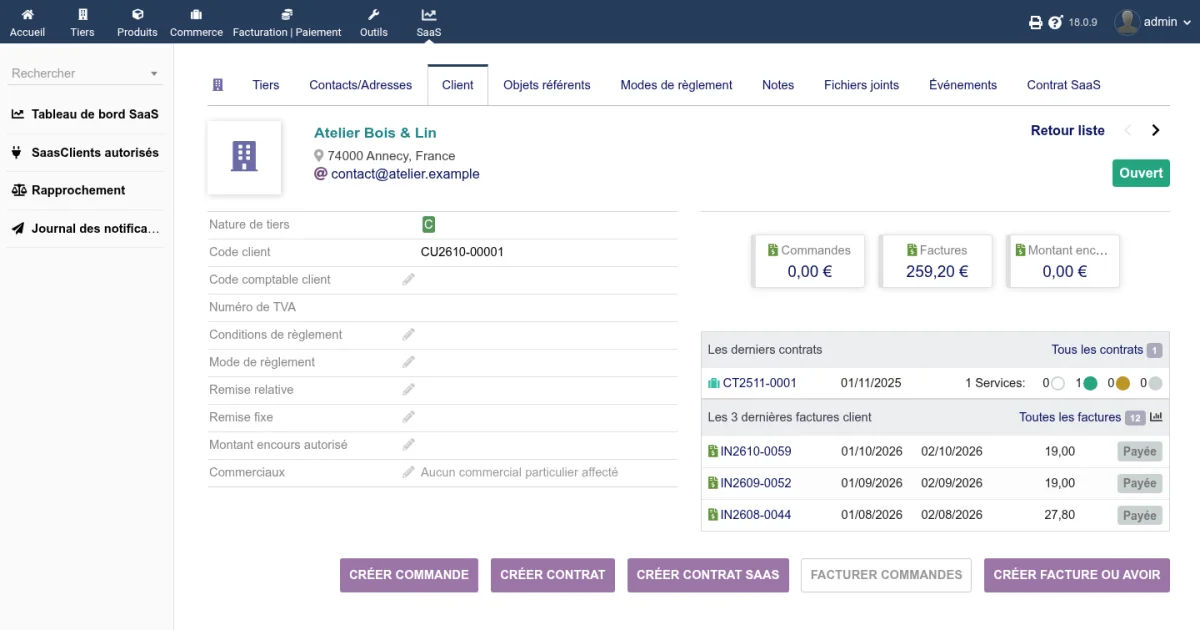
Open the customer's record and click Create SaaS contract, next to Create contract. The third party's SaaS contract tab and the Contracts menu's New SaaS contract entry lead to the same screen; from the menu, the customer is chosen first.
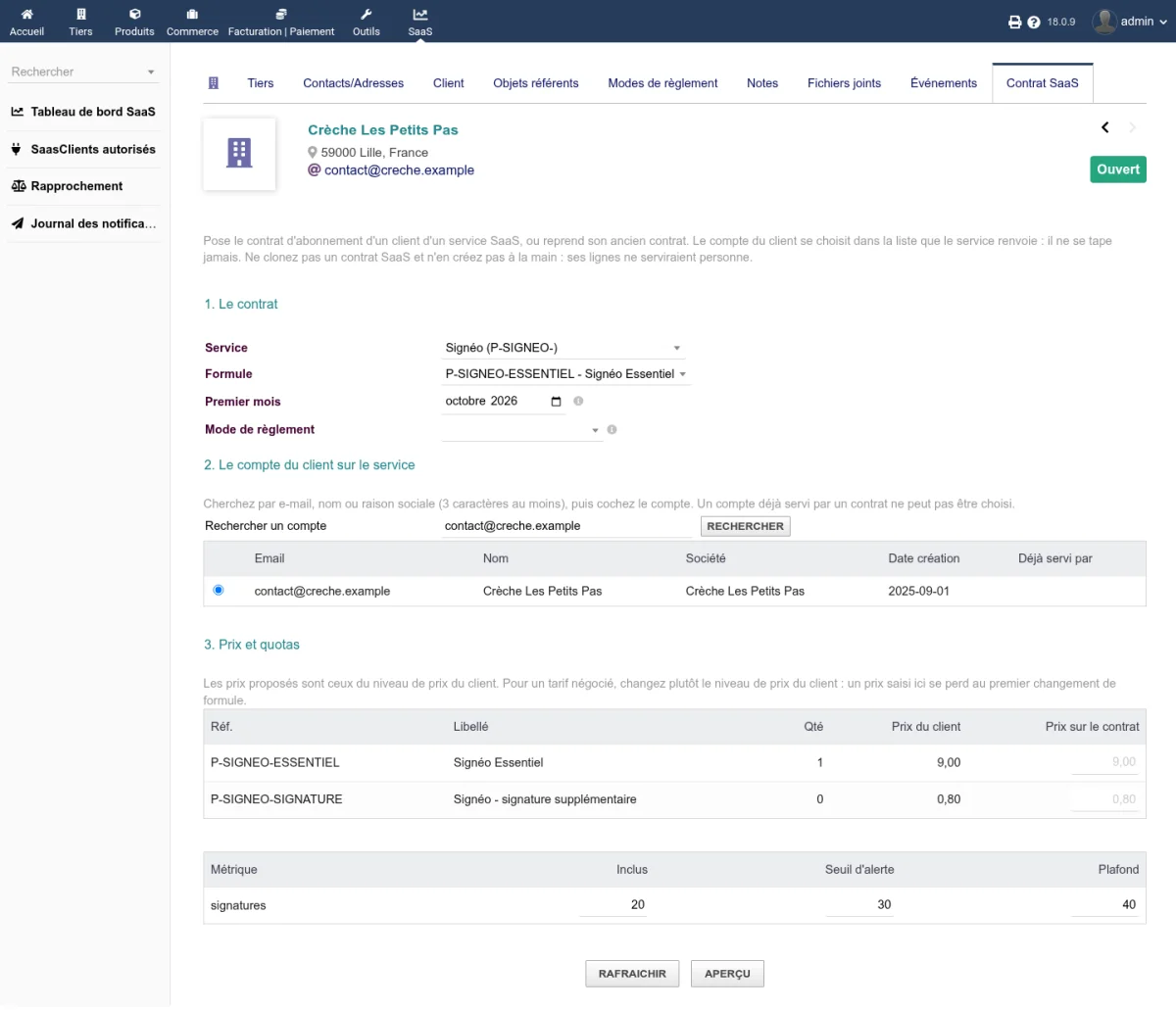
-
Choose the service, then the plan. Overage packs are not plans and are not offered.
-
Choose the first month. The contract starts on the 1st of that month. A past month is accepted for a regularization, but the elapsed months are not billed by the contract: they fall under a catch-up invoice, which the preview prices.
-
Check the payment mode and the bank account, taken over from the customer.
-
The customer's account on the service: the search starts by itself when the screen opens, with the customer's e-mail, and one account is ticked by default when it is the only free one. Otherwise, search by e-mail, name or company name with Search, then tick the account in the list. An account already served by a contract cannot be ticked: the Already served by column gives that contract.
-
The proposed prices are those of the customer's price level. For a negotiated price, preferably change the customer's price level (see "Negotiated prices"): a price entered on the screen is worth only for this contract, and is lost at the first plan change. The plan's quotas are modified the same way.
-
Click Preview. The screen says exactly what will be written: the account as the service describes it, the lines and their prices, the period and the first invoice's date.
-
Click Pose the contract. If you changed a field after the preview, nothing is written and a new preview is displayed.
The posed contract is validated and its lines open. A monthly template invoice is linked to it: it bills the current month from the first pass of the recurring invoices. The service is notified within the minute; if it does not answer, the screen says so and the automatic retry takes care of it. An agenda event "SaaS contract posed by ..." is added to the contract.
If a step fails (account disappeared from the service, service unreachable, account posed in between by someone else), the screen gives the reason and nothing is written, neither in Dolibarr nor at the service.
Taking over an old contract
A validated contract gets the Take over as SaaS contract button in two cases:
- one of its open lines carries a plan of another billing system that the service declares it takes over (see the Configuration page);
- it is a contract of the service without an account, made by hand or cloned: the SaaS dashboard lists them under Open plan lines without an account, with the same link.
The button opens the prefilled screen: replacement plan, the old contract's price if it differs from the customer's, the payment mode and bank account of its old template invoice (or of its last invoice), and the first month that this template invoice has not billed yet. All that remains is to search for the customer's account and check the preview.
At validation, the old contract's lines are closed, its template invoice is suspended so nothing is billed twice, and the new contract is linked to it. Unlike the takeover script, a contract without an active template invoice is taken over: this is the case of the customer nobody bills any more.
Subscriptions sold by a shop
A shop (One Page Basket) sells a plan through an ordinary order: one line per plan, on the plan's record or on its daily record (<plan>-JOUR) for the days until the 1st, at the amount the shop computed. Before validating the order, the shop asks the module which lines sell a plan (planOf()), then marks each (mark()) with the day its contract starts and the account's address:
- the address the customer logged into the shop with: the service finds their account, or creates it;
- or an address entered in the basket for another user, for example a subsidiary that must have its own contract: the service creates a new account, and refuses if the address already carries one.
An order can carry several plans: two services, or the same service for two addresses. Each marked line gives its own contract. Two lines of an order cannot sell the same service to the same address: an account serves only one contract.
What happens next, without intervention:
- At the order's validation, a draft contract is posed per marked line, without an account. Its lines come from the plan's record, at the customer's price, and not from the order line: the latter can be a prorata, and the template invoice is made from the contract.
- At the order's invoice, the invoice is linked to each contract: this is what allows the payment module to record the card.
- At payment, the module asks the service for the account of each address, once the payment is recorded. The service sends the activation link of an account it just created: this account is usable only once its address is confirmed.
- The account is written on the contract, the contract is validated, its lines opened at their start date, and its template invoice created.
The service is notified of nothing else: a shop order is not an act of the service, it receives neither its payment nor its cancellation, and cannot read it through the API.
When it does not go as planned:
- the service does not answer: the sale stays paid without an open contract. A scheduled task ("Open the contracts of paid shop sales") asks for the account again every hour. The customer's sales reps are warned at the first failure;
- the service refuses, or the account already serves a contract: the sale is refused and the customer's sales reps are warned. The draft contract stays linked to the order. Handle the sale by hand, for example by detaching the account from a reseller group in the service, then posing the contract with the New SaaS contract screen, and delete the draft. The order's other lines go on their way;
- the order is cancelled before payment: its draft contracts are deleted with it. The refund of a paid sale remains manual.
The SaaS dashboard lists these sales under Paid shop sales without a contract, with their state (waiting for the service, or refused) and the number of attempts; hovering the state gives the last error.
Taking over the contracts of another billing system
A service moving to this module often already has customers billed otherwise (by sellyoursaas, for example): a contract with a plan line, per-unit overage lines and a template invoice. The scripts/takeover.php script puts a contract of this module in place of each, without billing anything twice nor forgetting anything:
php scripts/takeover.php takeover.json --user=admin             # dry run, nothing is written
php scripts/takeover.php takeover.json --user=admin --apply     # takeover
php scripts/takeover.php takeover.json --user=admin --apply --only=24,27
The takeover file
The service writes it, because only it knows which account is which third party and which quotas it granted to each. All keys are mandatory:
{
  "client": "uptosign",
  "date_start": "2026-10-01",
  "period_months": 1,
  "plans": {"UTS-B-1-1-1": "P-UPTOSIGN-BASE", "UTS-A-1-16-40": "P-UPTOSIGN-ABO-16"},
  "metrics": {"UTS-SIG-SUP-01": "Sign", "UTS-SCE-SUP-01": "Seal", "UTS-API-SUP-01": "ApiKey"},
  "keep": ["DOLIBARR"],
  "skip": ["UTS-P-1-50-0"],
  "accounts": [
    {"fk_soc": 27, "account": "289", "plan": "P-UPTOSIGN-BASE", "label": "OPEN-DSI",
     "quota": {"Sign": {"included": 1, "soft": 159, "hard": 1999}}}
  ]
}client: the authorized client's reference, whose prefix bounds the records;date_start: the first day of the period the old contract already billed. The new contract covers it: the overage of this period is read by the service and billed by the new contract;plans: the old plan and the catalog record replacing it;metrics: the old per-unit line and the metric of the record's options it billed. Its price goes onto the overage line of this metric;keep: the lines taken over as they are (an option sold apart);skip: the products whose contract is not taken over (a prepaid pack, which runs to its term);accounts: one third party per line, the service account and, if needed, the negotiated quotas (included,soft,hard), which replace the record's for this contract only.
What the takeover does
For each account, the taken-over contract keeps the old contract's prices, not the record's:
- the plan line, on the catalog record, at the old price;
- one line per metric of the record's options, at zero quantity, at the old line's price for this metric, or at the record's when the old contract had none;
- the
keeplines; - the record's options, with the negotiated quotas.
Its lines run from date_start to the end of the period. Its template invoice is made from the old contract's last invoice, keeping its payment mode and bank account: the customer is debited as before. It generates for the first time at the end of the period. The old contract's template invoices are suspended in the same transaction. The lines are opened afterwards, and each opening is announced to the webservice.
Once the new lines are open, the old contract's lines are closed: a customer seeing two open contracts on their portal would be tempted to close one. Their products are outside the service's prefix, so this closing is not announced to it. The old contract points to the new one, and it is this link that makes the takeover replayable: a second run finds the taken-over contract, opens the lines still pending and closes the old contract's lines still open.
What is not taken over
The dry run says for each contract what will be done, or why it will not be:
- ignored: a third party without an open contract, a product of
skip, or no active template invoice any more (nobody bills it any more); - error: several open contracts for the same third party, a line named by no list of the file, an old line of a metric the record does not declare (its units would no longer be billed), an overage record missing from the catalog, or a contract still billed whose third party is not in the file.
An error touches only its contract: it stays billed as before.
A warning flags an old template invoice that was to generate at a date other than the end of the period (a customer billed on the 9th of the month, for example): the days between the two are billed twice, or not at all, depending on the direction of the gap.